



Our modern lineup of Chevrolet vehicles offers multiple cruise control options designed to make driving more comfortable during long trips so that you can arrive refreshed. While they may sound similar, each system works a little differently. Here’s a breakdown to help you understand which feature is right for you.
Cruise Control
Cruise Control allows the driver to set a preferred speed, and the vehicle will maintain that speed automatically.
To activate Cruise Control, make sure the cruise icon appears on the dashboard (often resembling a small speedometer icon). Once activated, press the “Set” button — typically located on the left side of the steering wheel. The vehicle will then maintain the speed you are currently traveling.
This system does not automatically slow down when approaching other vehicles. The driver must tap “Cancel” or apply the brake pedal to disengage Cruise Control. You can return to your previously set speed by pressing “Resume (RES),” which is the same control used to increase speed (+).
Adaptive Cruise Control
Adaptive Cruise Control is activated the same way as regular Cruise Control but adds intelligent speed adjustment.
This system automatically slows down or speeds up to maintain a selected distance from the vehicle ahead as traffic changes. The following distance is controlled using Gap Adjust, allowing the driver to choose a far, medium, or near distance setting.
The vehicle uses exterior cameras and sensors to detect vehicles ahead and maintain a safe following distance.
If your vehicle is equipped with Adaptive Cruise Control, you can switch back to regular Cruise Control at any time. To do this, press and hold the “Cancel” button located near the cruise control settings for 2–3 seconds. You’ll notice the cruise icon on the driver information display change.
Adaptive Cruise Control is a standard feature on select new Chevrolet vehicles, such as the 2026 Equinox and 2026 Traverse, and an available feature on most Chevrolet models as well. Visit Sparta Chevrolet to explore our lineupequipped with this intelligent cruise feature.
Chevrolet’s Super Cruise
Super Cruise is Chevrolet’s most advanced driving technology and works in conjunction with Adaptive Cruise Control. It’s available on select Chevrolet models and select trim levels. The feature requires an active OnStar plan for real-time map updates and precise GPS location to ensure a safe driving experience.
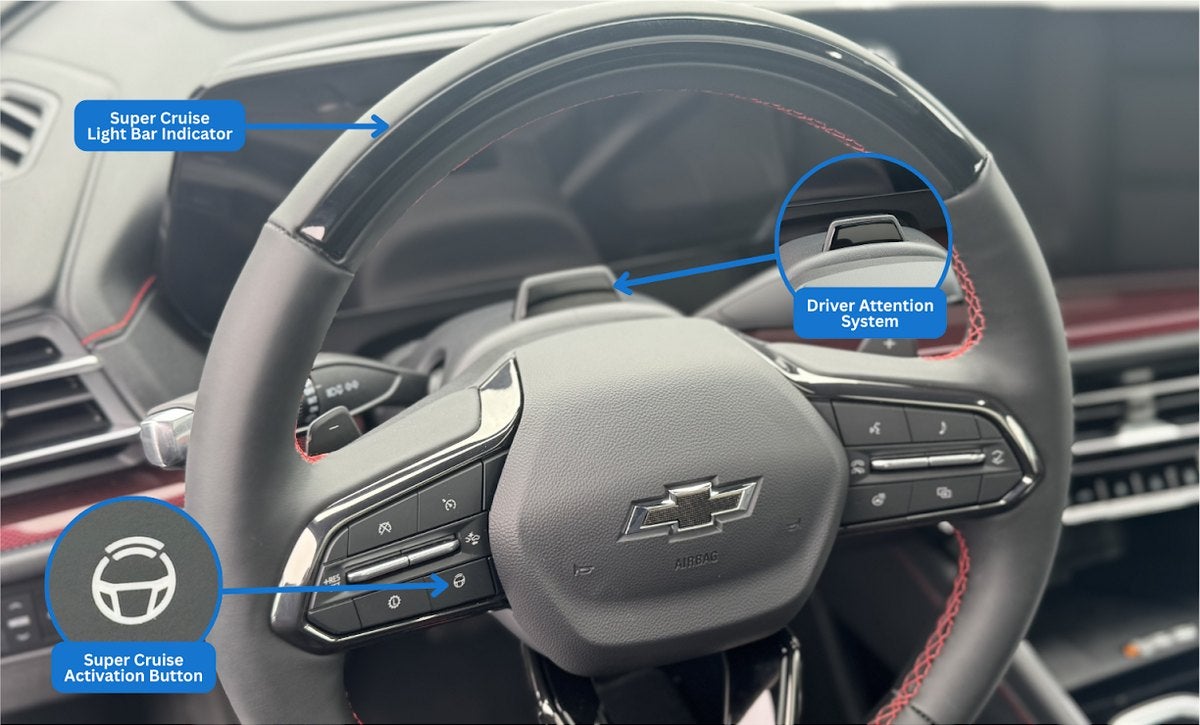
This hands-free driving feature maintains vehicle speed and can steer the vehicle for the driver on compatible highways. If your vehicle is equipped with Super Cruise, you’ll notice: (1) a Super Cruise icon on the steering wheel, (2) a light bar on the top of the steering wheel, and (3) a driver-attention sensor that’s placed in front of the driver’s instrument cluster.
Cameras, sensors, and LiDAR map data help position the vehicle on the road, respond to traffic, and detect curves. While Super Cruise allows hands-free driving, the driver must remain attentive and ready to take control when prompted. Adaptive Cruise Control and the Forward Collision System must be active to use this feature.
When driving on a compatible road, a white Super Cruise icon will appear on the instrument cluster. To activate Super Cruise, press the Super Cruise button on the steering wheel. When the steering wheel indicator light turns green, hands-free driving is available.
If the vehicle detects that the driver is not paying attention or if driving conditions become uncertain, alerts will prompt the driver to take control of the steering wheel.
This intelligent feature is designed to keep long drives smooth and comfortable — while keeping driver awareness a top priority.
Understanding Super Cruise Symbols
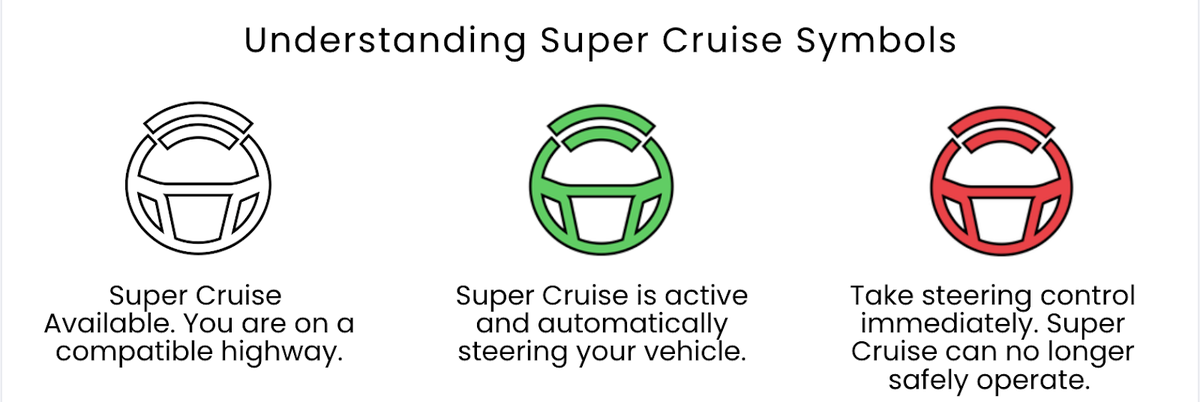
Solid green bar and solid green symbol: Super Cruise is active and automatically steering your vehicle.
Flashing green bar and solid green symbol (1st alert): Super Cruise is active, but the system detects that you need to pay attention to the road.
Pulsing blue bar and solid blue symbol: Super Cruise is active, but the system detects that you are manually steering. To engage Super Cruise, position your vehicle in the center of the lane and hold the steering wheel steady until you see the green indicators.
Flashing red bar, solid red symbol and beeps (2nd alert): You need to take steering control immediately. The system cannot operate properly under current conditions. Your vehicle will begin to coast until you take steering control. You will have to turn Super Cruise back on to use the system again.
Flashing red bar, solid red symbol, beeps and voice prompt (3rd alert): You need to take steering control immediately. A voice prompt will tell you to take over steering control. If you do not take steering control, your vehicle will steer and brake gradually to a stop in its current lane.
If this occurs, an OnStar Emergency-Certified Advisor will contact you to ensure that you are safe and are paying attention to the road. Super Cruise will not be available until you turn your vehicle off and ignition cycle your vehicle again.
Important Notes
Super Cruise is not available for towing unless the vehicle is equipped with Super Cruise towing capability. Do not use Super Cruise in slippery conditions, construction zones, or when road conditions are poor.
Have questions about which cruise control system is right for you? Contact Sparta Chevrolet and our team will walk you through it.